
VTAM/Switch
VTAM session manager
Keep z/OS and z/VSE users from wasting time logging on and off of different VTAM applications. With VTAM/Switch users can switch between multiple VTAM sessions (CICS, TSO, ICCF, IMS, TESTCICS, etc.) by either pressing a PF/PA key, trigger command strings or by entering a special two position character string in conjunction with a PF key (even one reserved by an application). Multiple VTAM sessions with the same application is also allowed. Your users can have as many sessions as you are willing to give them. For instance, programmers can have multiple sessions in CICS and in their text editor.
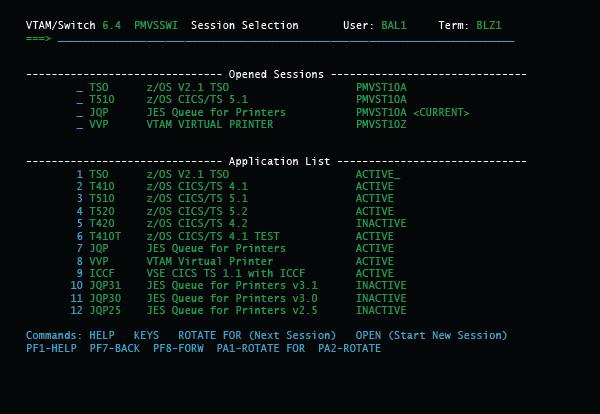
Systems Supported
VTAM/Switch operates as a standard multiple VTAM sessions application for z/OS and z/VSE. Under z/OS, it runs in its own address space. Under z/VSE, it runs in its own partition (including dynamic partitions).
Easy to Install
A pre-generated 'EASY INSTALL' version is supplied and installs in minutes.
Easy to Use
Many session managers require initial entry schemes. The user must sign-on entering a user-id and password. Then the user must select the various applications. Not with VTAM/Switch. It can be set up so the only thing the users have to know is the PF/PA key to switch sessions. Users need not know that VTAM/Switch even exists, just that they 'suddenly' have the ability to run multiple VTAM sessions, do screen prints and receive messages from a central administrator.
Predefined LOGON procedures can be set up for each user or for groups of users. Users who currently do not signon can be defined so they are automatically signed on to VTAM/Switch and preset VTAM applications when VTAM/Switch is activated (for example users can automatically have multiple CICS sessions available without having to go through LOGON procedures). VTAM/Switch can be transparent to the point that users are never required to see a VTAM/Switch menu. If you wish, some or all users can be given the ability to sign onto VTAM/Switch and LOGON to various VTAM applications.